C3rd
Netflix bug: Updating payment method
Posted: 28 Jul 2022, 20:27pm - ThursdayI registered my Netflix in New Zealand. So, credit card and mobile number will be NZ. Now, I moved to Australia. I need to update the information. So, I updated my mobile number to Australia. But then, when I update my credit card, it's asking for confirmation code but the form is in NZ! Then keep saying "Something went wrong!" Of course because your form is wrong. Because your form is using NZ form for the mobile confirmation. So dumb!
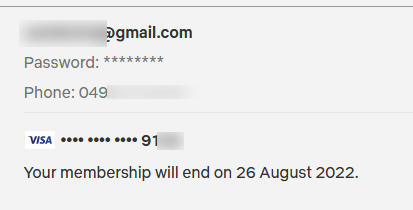
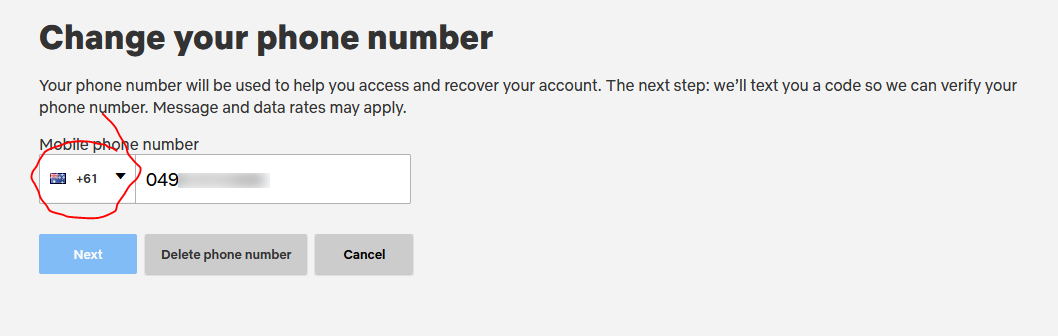

Don't get me wrong! Both countries have confusing flags. But I do know the difference between the flags. :) Back to the topic. Now, how can update my credit card?
So I contacted Live Chat and their recommendation, deactivate my account! Nice!
Now I have to wait until 27 August 2022 so I can update my credit card. Great! Best system!
RoundCube WebMail plugin: 2-Factor Authentication (2FA)
Posted: 26 Oct 2021, 21:50pm - TuesdayI was looking for a plugin to implement 2FA in my mail server. I found alexandregz/twofactor_gauthenticator but its quite outdated and quirky. Seems not maintained. So I forked it, the foundation is there and just need to improve it.
After few days of work, here's my improved 2FA for RoundCube webmail. Please feel free to use it and it works well with RoundCube v1.5.x
Git Repo: https://github.com/camilord/twofactor_gauthenticator
Windows: Setting up Apache 2.4.48 and PHP 7.4.20
Posted: 13 Jul 2021, 23:43pm - TuesdayBefore going thru the steps below, you need to download the installers first at http://camilord.com/downloads/Apache2.4.48_PHP7.4.20.zip
Then, just extract the zip which will give you both apache (httpd-2.4.48-o111k-x64-vc15) and php (php-7.4.20-Win32-vc15-x64). They are also in a zip, extract it in "C:\" and rename it like below.
would look like:
C:\Apache24
C:\php
then in apache, go to httpd.conf and edit it.
Add the following lines:
#  php 7.4.20 handler
AddHandler application/x-httpd-php .php
AddType application/x-httpd-php .php .html
LoadModule php7_module "c:/php/php7apache2_4.dll"
PHPIniDir "c:/php"
you can skip this step, you only do this when you have existing apache installation
httpd -k uninstall -n "Apache2.4"
then save it. go to Apache24\bin using CLI or powershell (as administrator) then run:
httpd.exe -k install -n "Apache2.4"
this will install as a service. then to start and stop
httpd -k start
httpd -k stop
or
net start "Apache2.4"
net stop "Apache2.4"
then for PHP, copy the php.ini-development as php.ini then adjust the necessary configuration
needed by your application. then since you're in dev mode, add this at the end of the php.ini:
[Xdebug]
zend_extension="C:/php/ext/php_xdebug-3.0.4-7.4-vc15-x86_64.dll"
xdebug.client_port="9003"
xdebug.mode=debug
;xdebug.mode=profile
you can find the file in this folder and make sure you copy that xdebug dll file to C:\php\ext\
then restart the apache…
and if you have changes in your php.ini on next edit, restart again your apache.
GPG error: The following signatures were invalid
Posted: 30 Jun 2021, 20:42pm - WednesdayW: GPG error: https://dl.yarnpkg.com/debian stable InRelease: The following signatures were invalid: EXPKEYSIG 23E7166788B63E1E Yarn Packaging <yarn@dan.cx>
E: The repository 'https://dl.yarnpkg.com/debian stable InRelease' is not signed.
N: Updating from such a repository can't be done securely, and is therefore disabled by default.
N: See apt-secure(8) manpage for repository creation and user configuration details.Solution:
sudo apt-key adv --keyserver hkps://keyserver.ubuntu.com --refresh-keys[ssllabs.com] How to get “A+” on SSL Server test as of "Feb 2021"
Posted: 23 Feb 2021, 5:02am - TuesdayIt's been a while I haven't checked my server with latest configuration with SSL stuff. When I did, I got B. So today, I make my SSL in my server great again! lol
So how I did it...
a2endmod headers
Make sure you enable the headers for the "Strict-Transport-Security"
Then next is edit your ssl.conf, currently my server is not Ubuntu 20.04LTS, not using CentOS 7.x anymore due to work related getting used to it. So in Ubuntu, the config file is located at: /etc/apache2/mods-available/ssl.conf
        #SSLCipherSuite HIGH:!aNULL
        SSLCipherSuite "EECDH+ECDSA+AESGCM EECDH+aRSA+AESGCM EECDH+ECDSA+SHA384 EECDH+ECDSA+SHA256 EECDH+aRSA+SHA384 EECDH+aRSA+SHA256 EECDH EDH+aRSA !CAMELLIA !SEED !3DES !RC4 !aNULL !eNULL !LOW !MD5 !EXP !PSK !SRP !DSS"

        #SSLProtocol all -SSLv3
        SSLProtocol TLSv1.2
        SSLCompression off
        SSLHonorCipherOrder on

        SSLUseStapling          on
        SSLStaplingResponderTimeout 5
        SSLStaplingReturnResponderErrors off
        SSLStaplingCache        shmcb:/var/run/ocsp(128000)

        # Header always set Strict-Transport-Security
        Header always set Strict-Transport-Security "max-age=15552000; includeSubDomains; preload"
So that's it, you'll get A+ for that coz I did! :) Cheers!
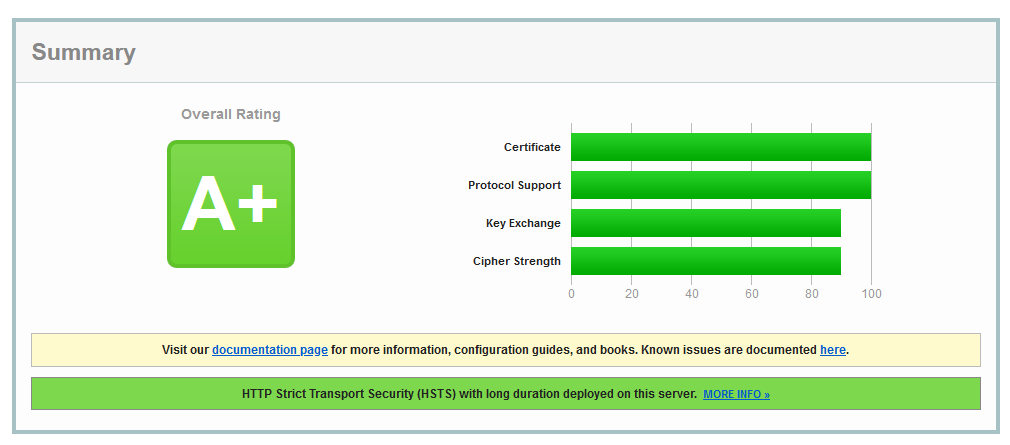
Implemented on my personal projects:
Delete all git local branches
Posted: 3 Feb 2021, 2:59am - WednesdayI was wondering how to delete all local git branch in Windows. But I didn't bother as I realized I got Cygwin anyway so I just took the Linux one... :) So I write a bash script named "clean_git.sh" with this contents:
#!/bin/bash
git checkout master
# git pull - optional
git status
git branch | grep -v "master" | xargs git branch -D
Cheers!
Never fly with Jetstar!
Posted: 27 Aug 2020, 23:36pm - ThursdayI booked a flight with Jetstar recently worth $700+. Covid19 hit in Auckland and lockdown to level 3. Jetstar announced that all flights are cancelled. So I ask for refund, they only refund as voucher with a one year expiration. But I rarely fly? Why can't I get my money back!!?
They been air by FairGo but still they insist that they can only give voucher.
I find their resolution bullshit! So don't fly with Jetstar! Lame service! Better fly with Air New Zealand.
Gradle Project Tests
Posted: 6 Jun 2020, 9:59am - SaturdayThe Error:
gradle Caused by: org.junit.platform.commons.PreconditionViolationException: Cannot create Launcher without at least one TestEngine; consider adding an engine implementation JAR to the classpathI've been writing tests on my java gradle project and I thought the tests was running every time I compile. I'm using IntelliJ IDEA and when I right click the test folder and `Run All Tests`, seems to work well.
Then I found out that it wasn't running at all when I ran the report.
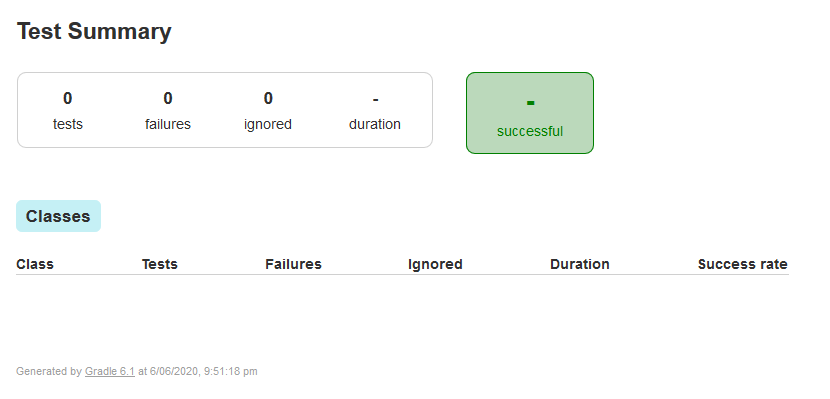
"Five hours later..." I almost gave up and decided to go back to maven. Then thought maybe I will search the error one last time. Landed to this page: https://discuss.gradle.org/t/gradle-4-6-and-junit-5/26061 -- then decided to give one last try. So I change my build.gradle
plugins {
    id 'java'
    id 'project-report'
}

group 'nz.camilord.alphaone.sample'
version '1.0.0-SNAPSHOT'

sourceCompatibility = 11
targetCompatibility = 11

repositories {
    mavenCentral()
}

dependencies {
    compile 'postgresql:postgresql:9.0-801.jdbc4'
    compile 'com.google.code.gson:gson:2.8.0'
    testCompile group: 'org.junit.jupiter', name: 'junit-jupiter-api', version: '5.6.2'
    //testCompile 'junit:junit:4.13'
}
to this new configuration:
plugins {
    id 'java'
    id 'project-report'
}

group 'nz.camilord.alphaone.sample'
version '1.0.0-SNAPSHOT'

sourceCompatibility = 11
targetCompatibility = 11

repositories {
    mavenCentral()
}

dependencies {
    compile 'postgresql:postgresql:9.0-801.jdbc4'
    compile 'com.google.code.gson:gson:2.8.0'
    testCompile group: 'org.junit.jupiter', name: 'junit-jupiter-api', version: '5.6.2'
    testCompile 'org.jetbrains.spek:spek-junit-platform-engine:1.0.89'
    testRuntime 'org.junit.jupiter:junit-jupiter-engine'
    //testCompile 'junit:junit:4.13'
}

test {
    useJUnitPlatform()
}

configurations {
    externalLibraries
    compile.extendsFrom (externalLibraries)
}
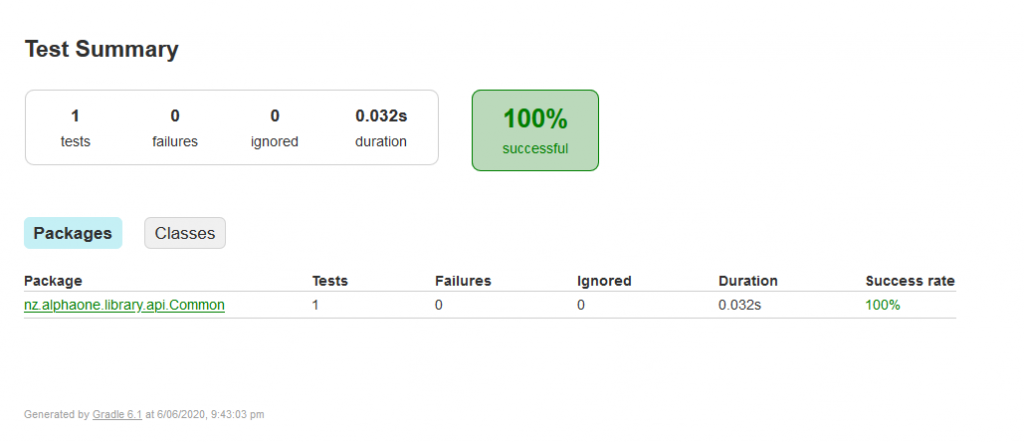
... and the result is a success! It works!
GitLab: docker DNS issue and container already in use
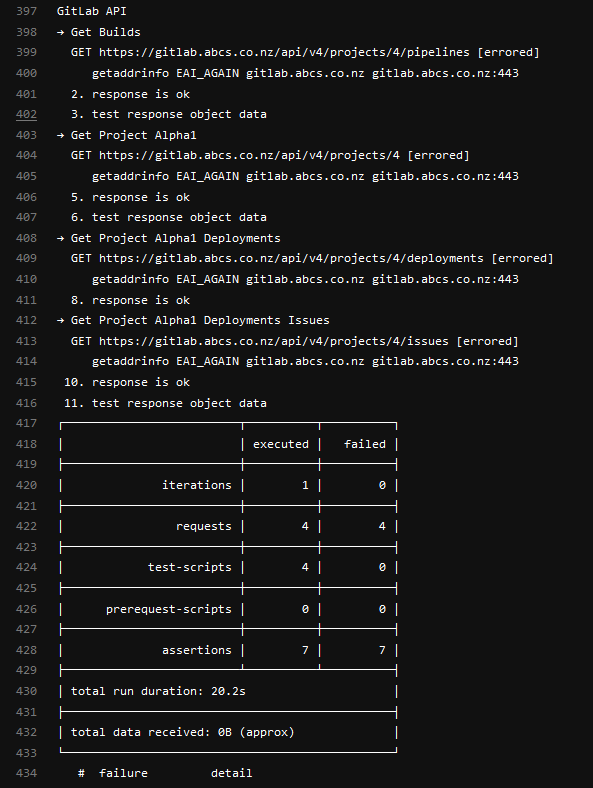
Posted: 6 May 2020, 21:46pm - WednesdayI decided to create another stage to test our API in GitLab CI runner using postman/newman. I made it work but there are issues from time to time like DNS issue and "container already in use" (see screenshot below). The common error that occurs most of the time is the DNS issue.
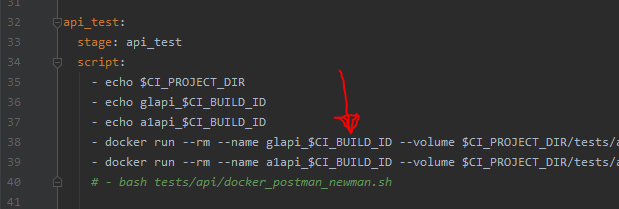
In my various experiments, I managed to resolve the `container already in use` issue by adding the container name with commit ID from gitlab.

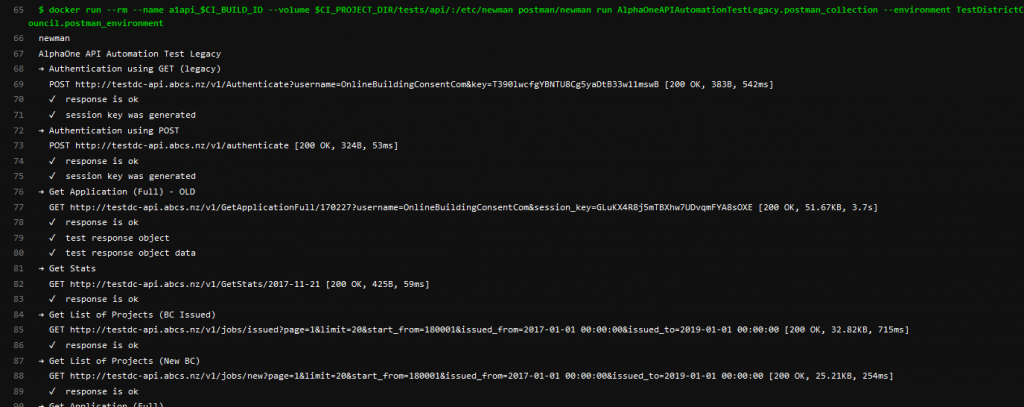
However, since I implemented the commit ID on the container, the DNS issue reduced from 8/10 fails to 2/10 fails. It still fail time to time, its not perfect but for now its tolerable. I hope there's a better solution.
RealEstate - House for Sale: 13 Mediterranean Grove, Palmerston North (SOLD)
Posted: 2 Mar 2022, 6:52am - Wednesday
This quality property has been designed and built to make living and outdoor entertaining a breeze.
The heart of the home is the beautiful kitchen with a stone bench countertop, quality appliances, walk-in pantry, and breakfast bar - an ideal spot for quick easy family meals. The kitchen overlooks the relaxed family dining living with seamless flow to the expansive covered entertaining patio, which is enjoyed all year round - you will be impressed! The separate lounge allows for you to pop away for a quiet moment.
You will enjoy the roomy master bedroom with an en suite, walk-in wardrobe, and access outdoors to the patio. The other three bedrooms are good sizes with the third located near the front entrance and family living, perfect for those who work from home and those who wish the kids to be nearby while working on their homework.
A large double garage with internal access is a must and don't we all love a separate laundry room. Gardens are low maintenance and with some raised garden beds.
The location is superb, close to the Summerhill shopping centre and zoned for quality schools. This quality brick home was built in 2019 and is in "as new" condition.
Please ring us today to make a time to view or come along to one of our Open Homes, we would love to show you through. Call Lyndsey - 0274462886 or Stu - 0274441594
For further information on this property please visit:
https://www.13mediterraneangrove.co.nz or https://rwpalmerstonnorth.co.nz/PNO30173
STATUS: SOLD
VM: Resize Partition on a running system
Posted: 20 Sep 2021, 22:09pm - MondayI was stuck for a while how to resize a running partition in my VM. Been searching for answers and all answers are quite long except this one:
root@silex5:~# df -h
Filesystem      Size  Used Avail Use% Mounted on
udev            3.9G     0  3.9G   0% /dev
tmpfs           798M  1.1M  797M   1% /run
/dev/sda2        49G   32G   15G  69% /
tmpfs           3.9G     0  3.9G   0% /dev/shm
tmpfs           5.0M     0  5.0M   0% /run/lock
tmpfs           3.9G     0  3.9G   0% /sys/fs/cgroup
/dev/loop0      100M  100M     0 100% /snap/core/11420
/dev/loop1       18M   18M     0 100% /snap/pdftk/9
/dev/loop2      100M  100M     0 100% /snap/core/11606
tmpfs           798M     0  798M   0% /run/user/1011

root@silex5:~# growpart /dev/sda 2
CHANGED: partition=2 start=4096 old: size=104851456 end=104855552 new: size=251654111,end=251658207

root@silex5:~# resize2fs /dev/sda2
resize2fs 1.44.1 (24-Mar-2018)
Filesystem at /dev/sda2 is mounted on /; on-line resizing required
old_desc_blocks = 7, new_desc_blocks = 15
The filesystem on /dev/sda2 is now 31456763 (4k) blocks long.

root@silex5:~# df -h
Filesystem      Size  Used Avail Use% Mounted on
udev            3.9G     0  3.9G   0% /dev
tmpfs           798M  1.1M  797M   1% /run
/dev/sda2       118G   32G   81G  29% /
tmpfs           3.9G     0  3.9G   0% /dev/shm
tmpfs           5.0M     0  5.0M   0% /run/lock
tmpfs           3.9G     0  3.9G   0% /sys/fs/cgroup
/dev/loop0      100M  100M     0 100% /snap/core/11420
/dev/loop1       18M   18M     0 100% /snap/pdftk/9
/dev/loop2      100M  100M     0 100% /snap/core/11606
tmpfs           798M     0  798M   0% /run/user/1011
root@silex5:~# reboot
Reference: https://unix.stackexchange.com/questions/137482/how-to-to-resize-an-ext4-partition-from-the-command-line
testssl.sh - testing SSL
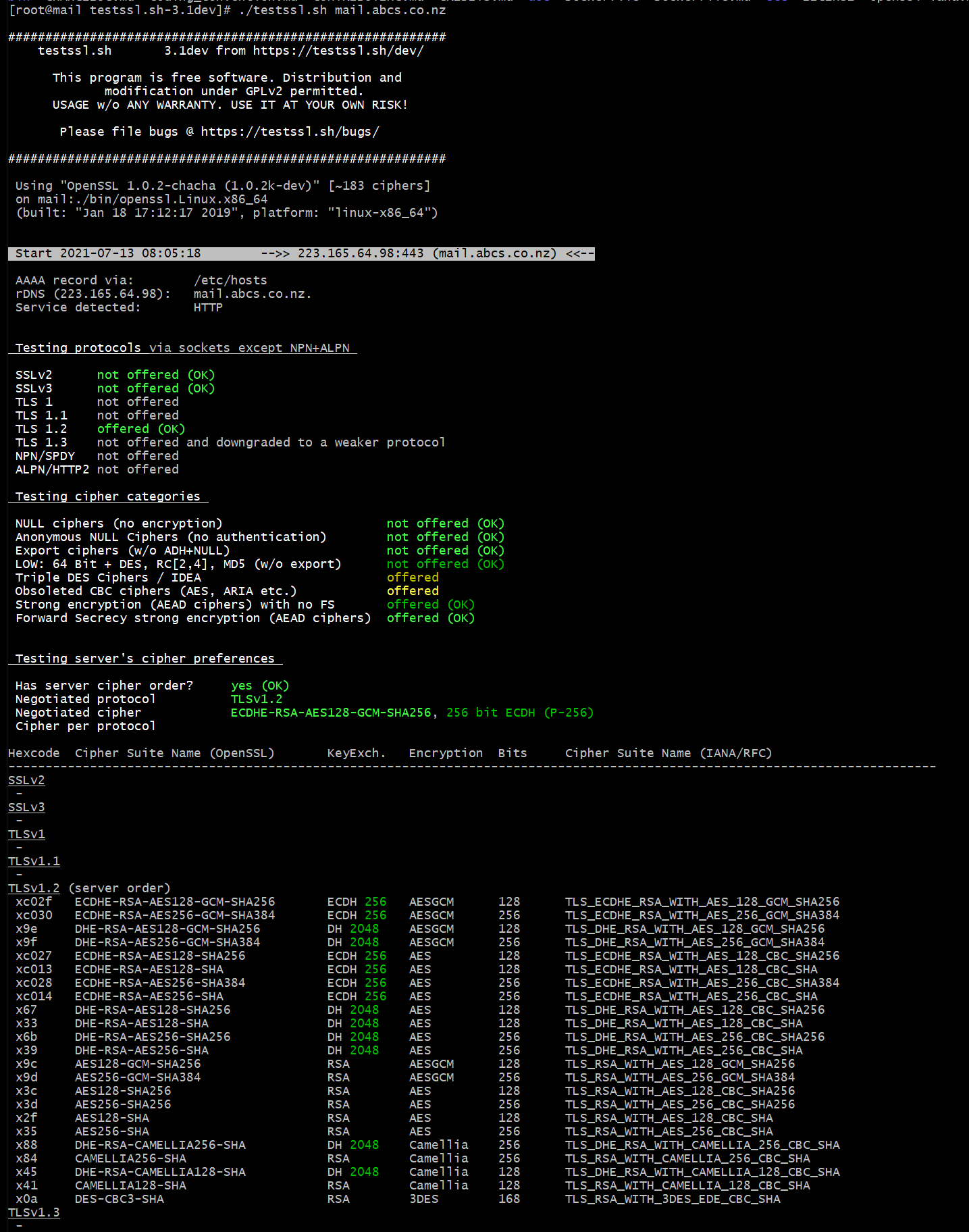
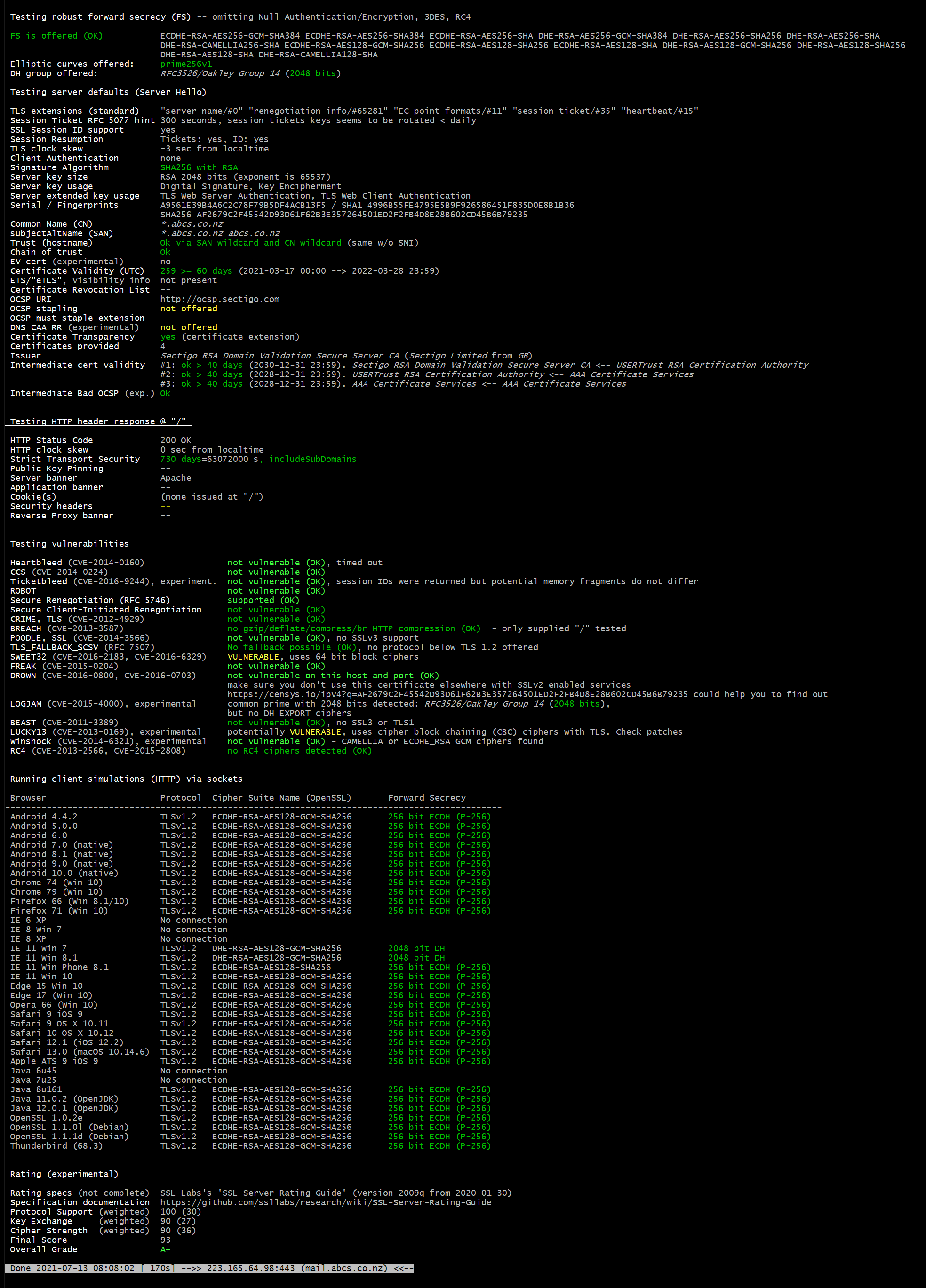
Posted: 12 Jul 2021, 20:33pm - MondayI have been using https://www.ssllabs.com/ssltest/analyze.html and today I found a script to give me report the same ssllabs.com does.
The bash script based is really good. Very helpful giving me the report I need.
https://testssl.sh/ -- You can download the script from their github.
Here's the sample report: (I can display this because its an A+ verdict)
Free Planning Poker
Posted: 12 Jun 2021, 13:26pm - SaturdayHello Agile/Scrum people ...
If you are looking for free planning poker, use http://www.freeplanningpoker.co.nz/ or http://www.freeplanningpoker.site/ or http://www.freeplanning.poker/ and there will be no ads or limitation of 5 users or 5 issues then try to force you to upgrade to premium. The limitation is like it can create 100 issues of each gameplay and of course limit to 8 players, more than that will be a conference already. So 8 users or players, cast a vote and get the score for your issues.
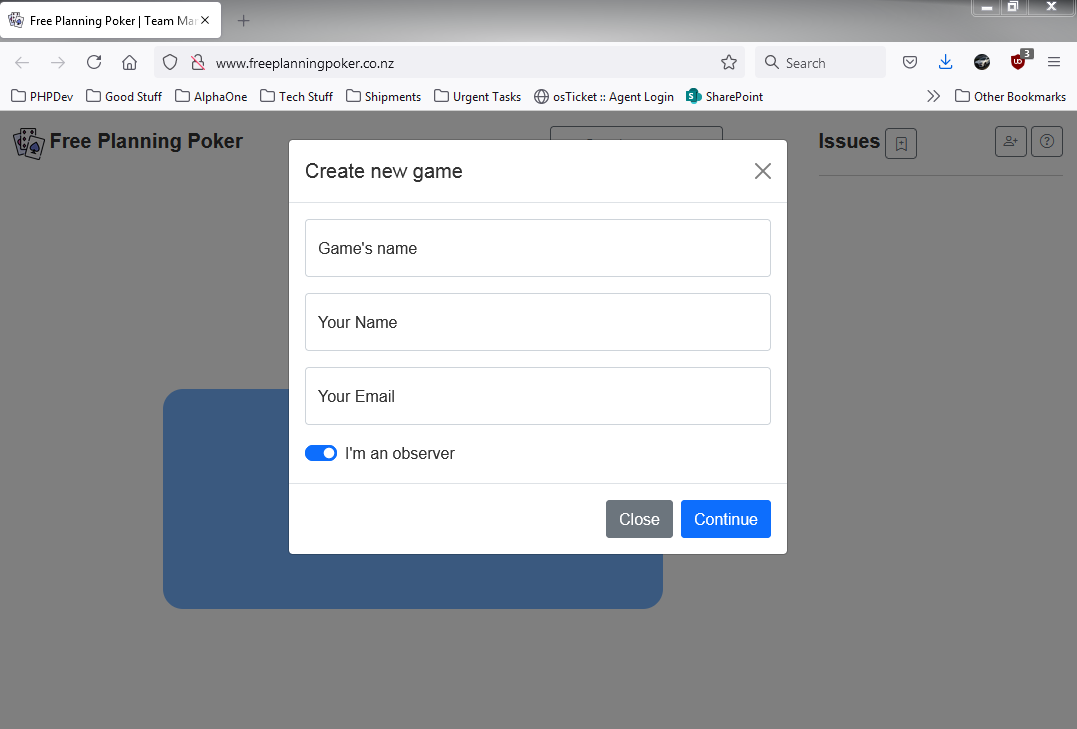
This application is used for team management amd planning for agile team.
Symfony 5.2 Command / Console connecting to DBAL
Posted: 8 Feb 2021, 6:51am - MondayI have been searching how my Symfony Command/Console can connect to the database using DBAL. Somehow there's no working solution that its not either deprecated or the solution was lower version of what I am looking for.
So I made my own solution, takes a while but it works.
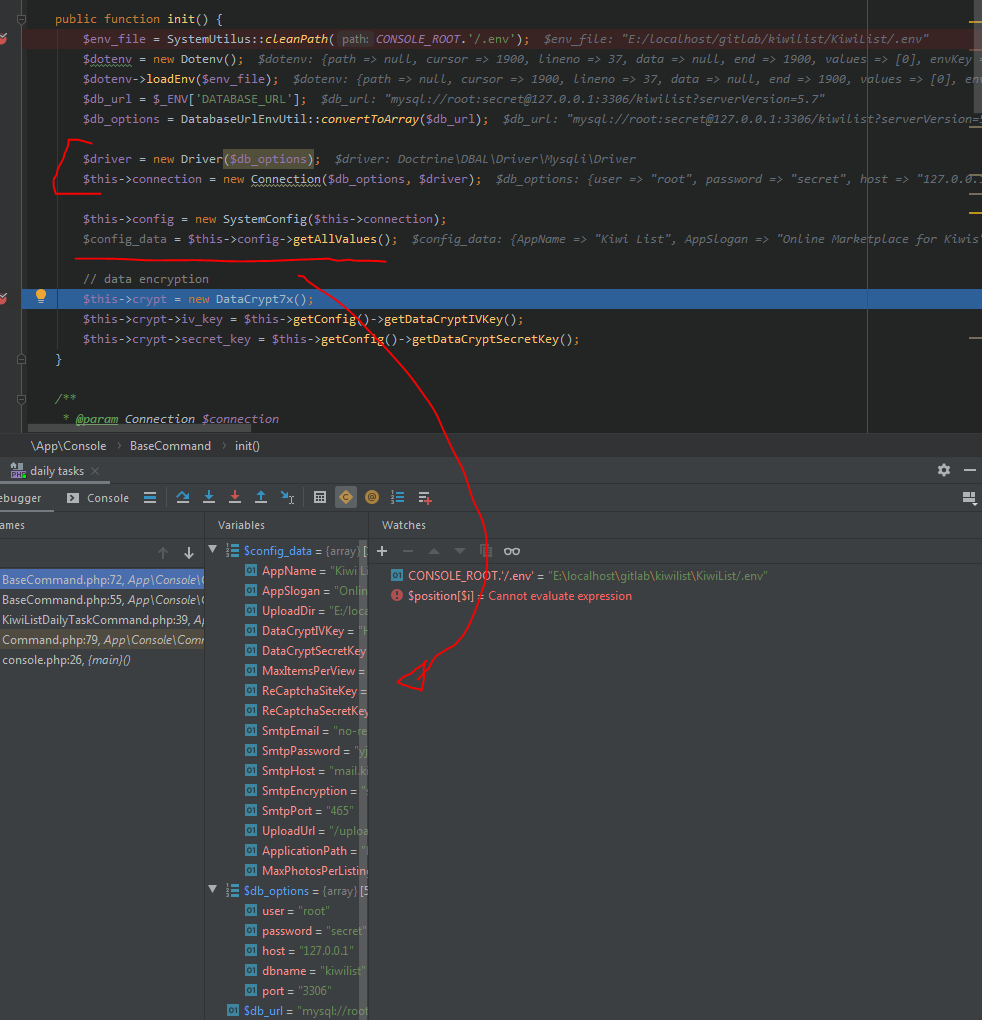
- I used the Symfony\Dotenv class to read the .env file and get DATABASE_URL value
- Then I created a class to parse the DATABASE_URL value to Driver/Connection class required array structure (see screenshot below, $db_options variable)
- then I instantiate Driver class and feed the parsed array and Driver to Connection (see sample code below)
Filename: DatabaseUrlEnvUtil
/**
 *  // mysql://root:secret@127.0.0.1:3306/dbname?serverVersion=5.7
 *
 * Class DatabaseUrlEnvUtil
 * @package App\Utils
 */
class DatabaseUrlEnvUtil
{
    /**
     * @param string $str
     * @return array
     */
    public static function convertToArray(string $str) {
        $breakers = [
            /*'driver' => [
                'delimeter' => '://',
                'position' => 0
            ],*/
            'user' => [
                'delimeter' => [':', '//'],
                'position' => [1, 1]
            ],
            'password' => [
                'delimeter' => [':', '@'],
                'position' => [2, 0]
            ],
            'host' => [
                'delimeter' => ['@', ':'],
                'position' => [1, 0]
            ],
            'dbname' => [
                'delimeter' => ['/', '?'],
                'position' => [3, 0]
            ],
            'port' => [
                'delimeter' => [':', '/'],
                'position' => [3, 0]
            ]
        ];

        $data = [];
        foreach($breakers as $key => $breaker) {
            $delimeter = isset($breaker['delimeter']) ? $breaker['delimeter'] : null;
            $position = isset($breaker['position']) ? $breaker['position'] : 0;

            if (is_null($delimeter)) {
                continue;
            }

            if (is_array($delimeter)) {
                $tmp_data = $str;
                foreach($delimeter as $i => $item) {
                    $tmp = explode($item, $tmp_data);
                    $tmp_data = $tmp[$position[$i]];
                }
                $data[$key] = $tmp_data;
            } else {
                $tmp = explode($delimeter, $str);
                $data[$key] = isset($tmp[$position]) ? $tmp[$position] : null;
            }
        }

        return $data;
    }
}
Console/Command Output:
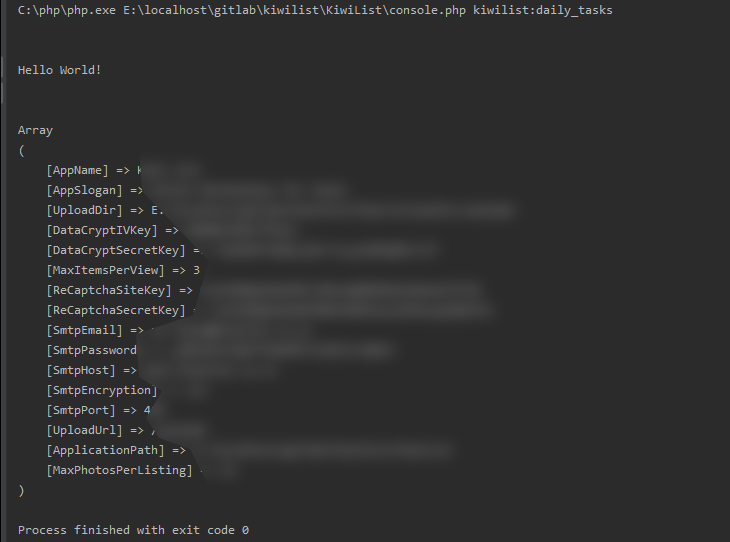
That's it, problem solved.
My Progression to Senior Software Engineer at Objective
Posted: 13 Oct 2020, 1:51am - Tuesday
In 2012, I was visiting my sister in New Zealand when I decided I wanted to move over there from The Philippines, too. Soon I was working as a PHP/SQL Programmer, developing and maintaining New Zealand’s first end-to-end Building Consenting System, AlphaOne.
I enjoyed it and it was very demanding. I was pretty much solely responsible for managing AlphaOne and had to wear multiple hats in addition to writing code. When AlphaOne was acquired by Objective last year, I felt a really welcome change to my job.
There’s so much support: everything is manageable. My worklife balance has changed dramatically and I now enjoy my weekends without worrying about work, here’s a little bit more about how I got here and what it’s like working at Objective.
My road to Senior Software Engineer at Objective
I graduated with a BS Information Management in 2008 from Xavier University, Philippines. While studying, I freelanced as a desktop application developer (using .Net C# + MySQL) and I mostly wrote web based applications, using PHP or LAMP stack.
After working for a while as a lecturer, I was employed remotely by companies all over the world to do PHP web applications, maintain or build applications and websites, and manage web servers.
Eventually I found myself in NZ on the AlphaOne project. ] With one remote and two on-site developers, we managed to stabilise the system and grow our client base from 2 to 12 in just 3 years.
AlphaOne was acquired by Objective in March 2019 and as the Senior Software Engineer for Alpha One, I love working for Objective! I write code, manage our mail and web servers and am also responsible for developing hybrid mobile applications (a mobile version of AlphaOne), so we can easily maintain and deploy it on the Apple, Google and Windows stores.
How I developed my skills
In 2004, before I knew anything at all about the existence of Facebook, I had a very similar idea. I didn't write the code until 2005 though, when I built my own popular and exclusive social network called Zabyer.
The challenges I faced with it (such as performance degradation, compatibility issues, exploitation and hacking) brought my knowledge up to a commercial level long before I’d even finished university. Then, equipped with that knowledge, I started freelancing, which added to my skills in dealing with customers and clients.
I created another social network in 2008 but I struggled to finance it and realised I really just needed money. That’s when I began working remotely for multiple companies, before finding my job at AlphaOne.
The most important things I’ve learned on my career journey
Probably the most important things I’ve learned over the years are:
- Working with a legacy system and someone else’s code is hard! But you should learn to appreciate other people’s work because you have the knowledge to improve it.
- Every developer has their own style, so whoever you’re on a team with, come up with rules you can all agree on. I’ve also learned I should get my teammates involved with what I’m doing instead of making them wait around for my part.
- When it comes to small-medium businesses, I’ve learned how to balance what a business wants and is capable of, with its customers’ needs. With the information from both sides, I can recommend and easily deliver the output.
How we develop our engineers at Objective
At Objective, our best and well-tested approach is to start off new employees on bug fixing (from easy to hard) and guide them closely. This way, they will learn the project structure, flows and its ecosystem.
I don't tell them all the details, but I do show them how it is done rather than giving a long list of instructions. A visual presentation stays in the mind a lot better. Once they catch up with the other developers, they can be eased into bug fixing and other mixed tasks, like new stuff and best practices.
We like to include our new engineers in research and development as well, to make them excited about new technologies and boost their confidence to do more things. I always listen to their ideas and allow them to explore: I want them to feel like they are truly contributing to a project.
Personally, I’m glad all my hard work has led me here. I love the culture and the energy of this company. To me, Objective is the perfect workplace!
Do you think you have what it takes to become part of our engineering team at Objective? Check our careers page for job openings!
FaceApp, TikTok & COVID19 Vaccine
Posted: 13 Aug 2020, 4:48am - ThursdayWhy is it western countries always try to nail down China and Russia?
When FaceApp become popular, Western countries then said its security concern. Russian government will steal your information etc.
When TikTok become popular, Western countries then said its security concern. The Chinese government will steal your information etc.
Yet google, facebook, instagram, twitter have all the information and CIA been mining the data for their own gain and nobody complains.
Now Russia have the COVID19 first vaccine, been all over the news that's it's not safe and so on. Why don't other countries help Russia instead?
Why can't we help each other? Is power and money always control us or our civilation?
IntelliJ IDEA + Java versions + Maven + Gradle
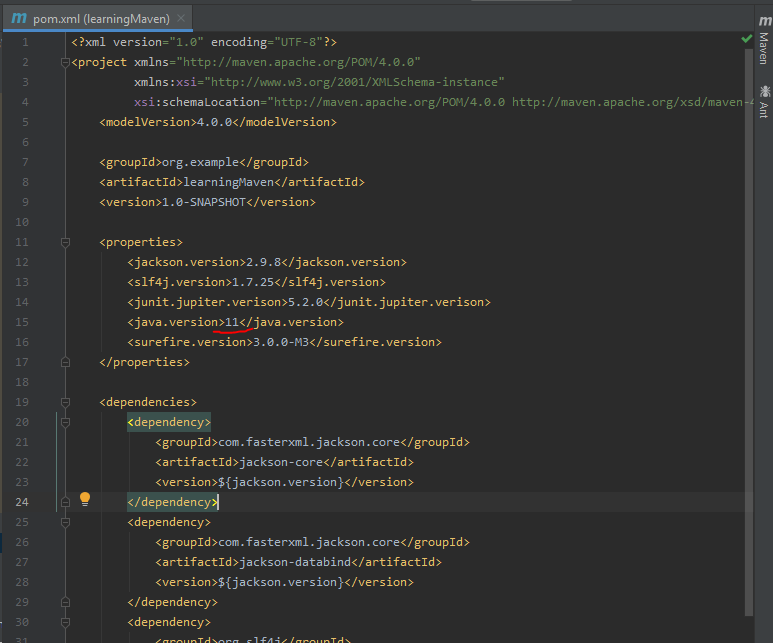
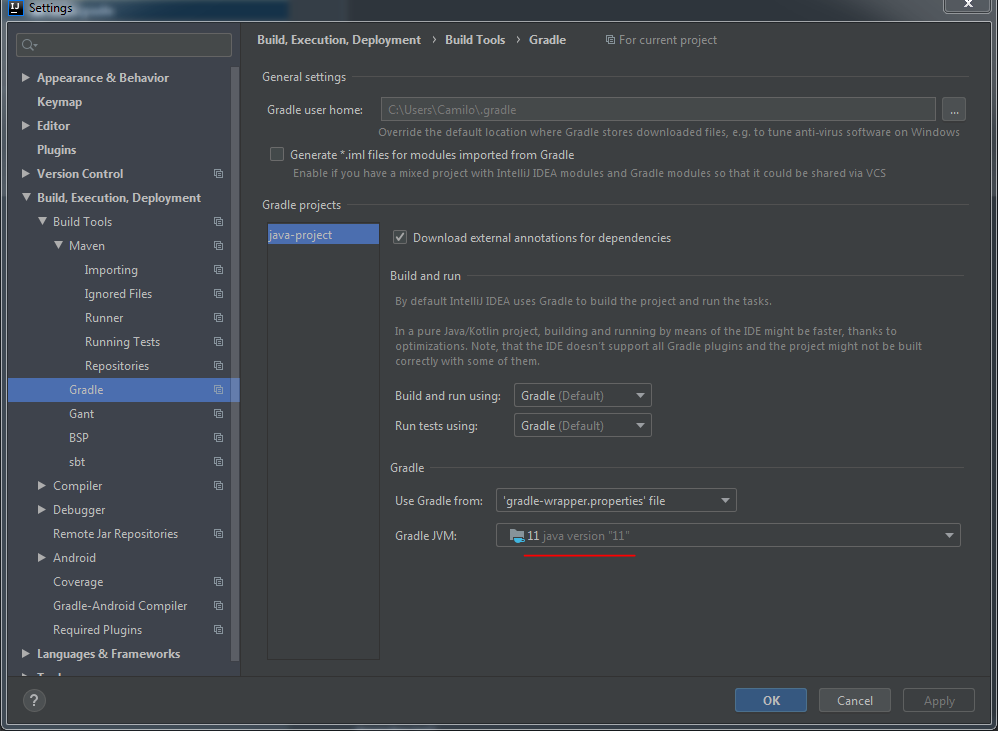
Posted: 5 Jun 2020, 11:57am - FridayOk, I have been writing java codes from quite some time now. And most common I forgot to set are the following areas to configure in IntelliJ IDEA.
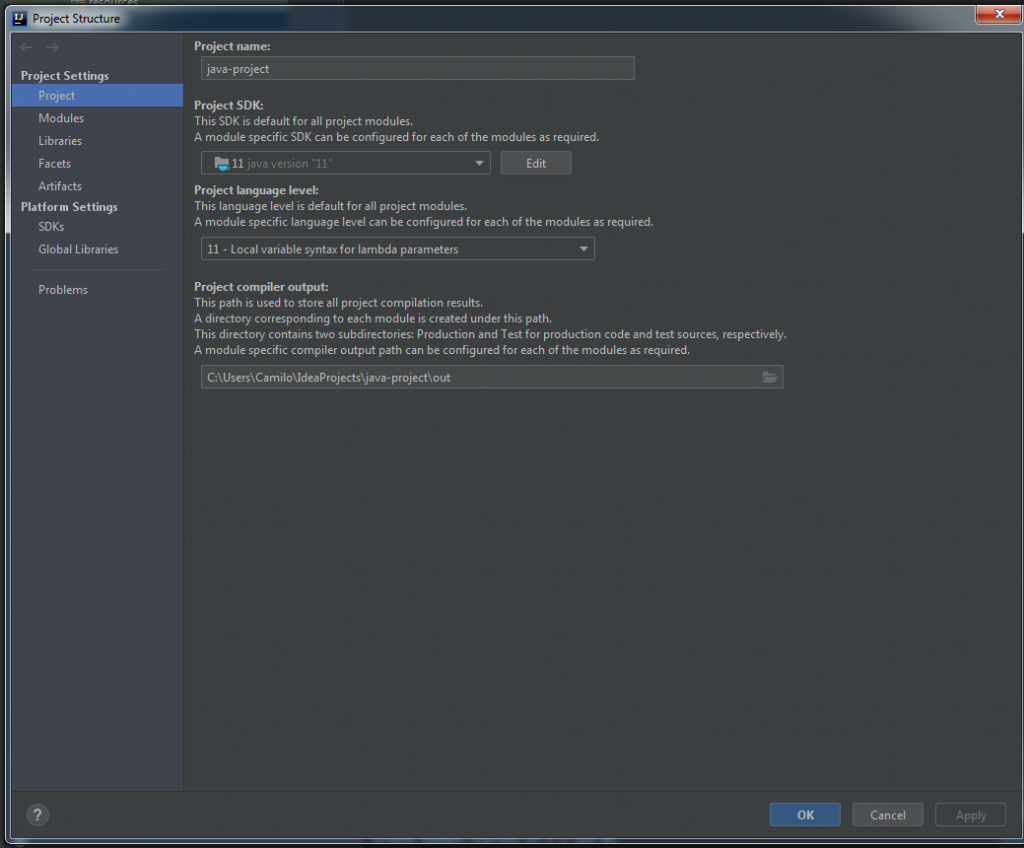
- Project Structure - always set both Project SDK and Project Language Level
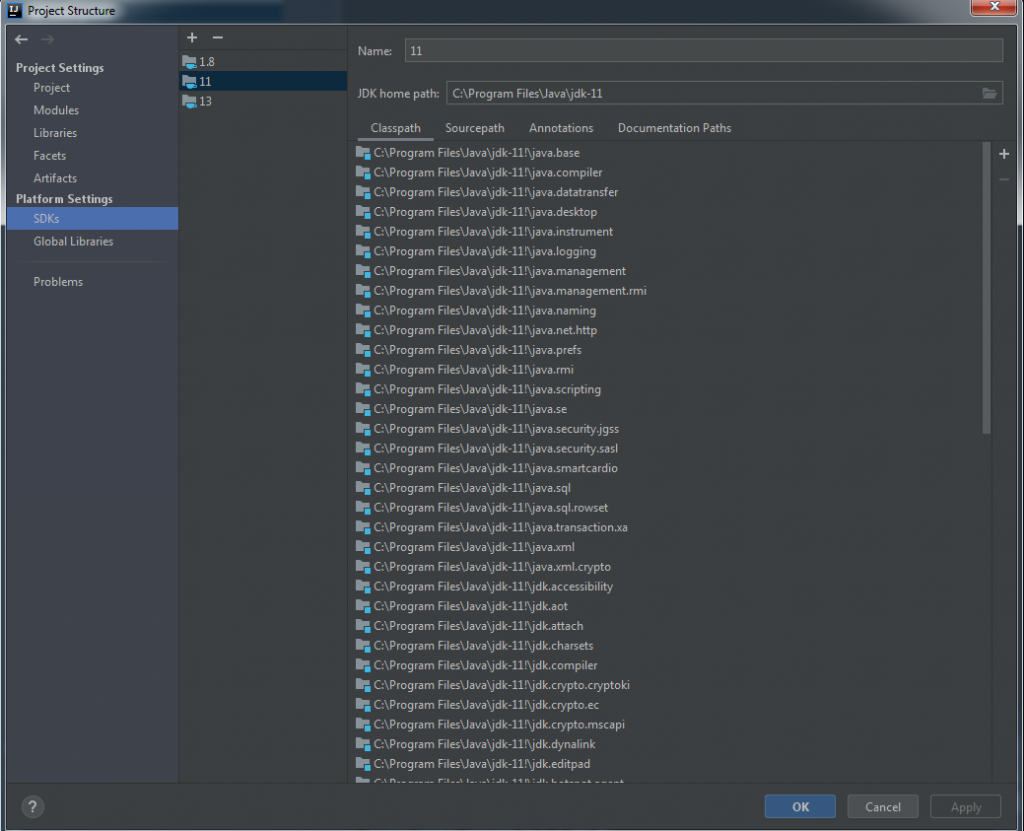
2. SDK - you have to define the JDK home path to use in your project
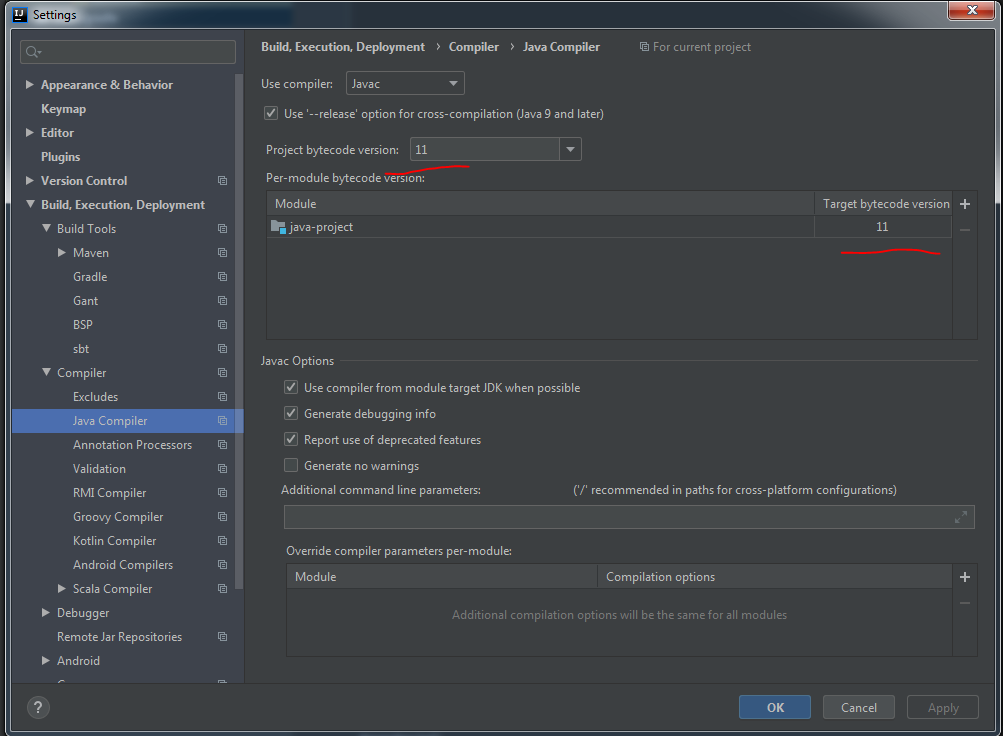
3. Java bytecode - ensure that you set the Project bytecode version and add your project in per-module bytecode version and define the target bytecode version.
4. Maven - pom.xml file
5. Gradle - build.gradle file
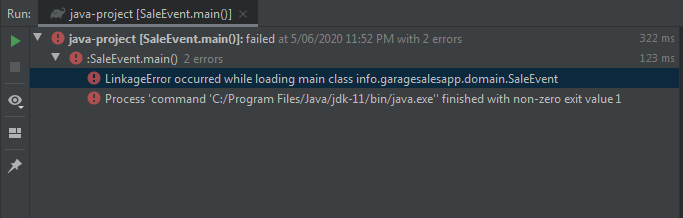
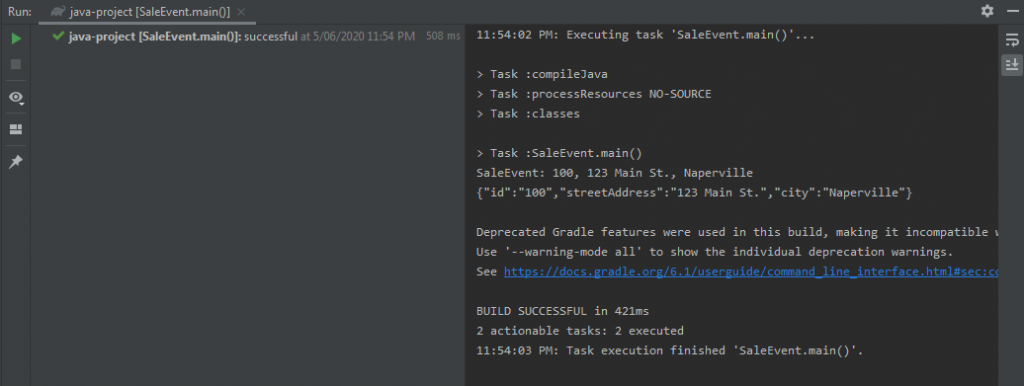
And if you fail to configure these versions, you'll end up seeing RED texts/icons.
Root composer.json requires PHP extension ext-zend-opcache * but it is missing from your system. Install or enable PHP's zend-opcache extension. (Windows 7 or Windows10)
Posted: 10 Feb 2022, 20:28pm - ThursdayIssue:
C:\localhost\projectApp>php composer.phar update
Loading composer repositories with package information
Updating dependencies
Your requirements could not be resolved to an installable set of packages.

  Problem 1
    - Root composer.json requires PHP extension ext-zend-opcache * but it is missing from your system. Install or enable PHP's zend-opcache extension.
Solution:
Edit your php.ini and add this:
zend_extension=C:/php/ext/php_opcache.dllthen uncomment ...
[opcache]
; Determines if Zend OPCache is enabled
;opcache.enable=1

; Determines if Zend OPCache is enabled for the CLI version of PHP
opcache.enable_cli=1
That's it! To confirm it, do:
C:\localhost\projectApp>php -v
PHP 7.4.20 (cli) (built: Jun  1 2021 20:31:10) ( ZTS Visual C++ 2017 x64 )
Copyright (c) The PHP Group
Zend Engine v3.4.0, Copyright (c) Zend Technologies
    with Xdebug v3.0.4, Copyright (c) 2002-2021, by Derick Rethans
    with Zend OPcache v7.4.20, Copyright (c), by Zend Technologies
Corruption in the Philippines: How to eliminate!
Posted: 11 Aug 2021, 22:57pm - WednesdayJohn shared this video to me:

This is one of the reason I left from the Philippines. I would say, ALL government officials are corrupt. The future is so dark to become first world country category. Marcos did it but then the corrupt senators put him down and until now Philippines is crawling to poverty.
PH should have tougher punishment or laws, to eliminate these politicians or government officials, PH should execute corrupt people.
Should create a law of the following:
- Firing squad execution for severe corruption (over 5 million pesos)
- Minor corruption, imprisonment for life (between 1 and 5 million pesos)
- Any corrupt or have records cannot run or sit to any government position/role
- if the officer caught in corruption, all the family members and 1st degree of the family should be remove from office (if any) and cannot run or sit to any position/role in government
I bet if this will be the law, Philippines will improve significantly. If human rights bump in, come on! Philippines is over populated. Eradicating few evil people is good for the many.
I believe Duterte is trying to lift Philippines, but all the officials surrounds him are just all evil greed and corrupt.
Securing Mail Server SSL/TLS
Posted: 8 Jul 2021, 23:28pm - ThursdayI have been auditing our servers security. I was trying to resolved some issues detected by tenable.io, one of the issue raised was the SWEET32. There are few, by I am not disclosing that here. :) To resolve all vulnerabilities, these are my new settings in my postfix (main.cf) :
smtpd_tls_mandatory_exclude_ciphers = aNULL, eNULL, EXPORT, DES, RC4, MD5, PSK, aECDH, EDH-DSS-DES-CBC3-SHA, EDH-RSA-DES-CDC3-SHA, KRB5-DE5, CBC3-SHA, EXP, MEDIUM, ADH, AECDH, DSS, ECDSA, CAMELLIA128, 3DES, CAMELLIA256, RSA+AES
smtpd_tls_mandatory_protocols = !SSLv2 !SLv3 !TLSv1
smtpd_tls_protocols = !SSLv2 !SSLv3 !TLSv1
then restart postfix:
postfix stop; postfix startthat's it. it resolved my issues.
Quirks on jQuery plugin "lc_switch"
Posted: 12 May 2021, 21:57pm - WednesdayWe've been using lc_switch for our new UI revamp and found some quirks. Here they are:
When binding lc_switch jQuery plugin, do not do these following:
QUIRK 1
WRONG
<label class="ocl-switch-label" for="app_confidential">
    <input class="ocl-switch" type="checkbox" id="app_confidential" name="app_confidential" /> Is the project confidential?
</label>
CORRECT
<label class="ocl-switch-label" for="app_confidential">
    <input class="ocl-switch" type="checkbox" id="app_confidential_answer" name="app_confidential" /> Is the project confidential?
</label>
EXPLANATION:
You should not name the element
idandnamethe same
QUIRK 2
WRONG
<label class="ocl-switch-label" for="app_confidential_answer">
    <input class="ocl-switch" type="checkbox" id="app_confidential_answer" name="app_confidential" /> Is the project confidential?
</label>
CORRECT
<label class="ocl-switch-label" for="app_confidential">
    <input class="ocl-switch" type="checkbox" id="app_confidential_answer" name="app_confidential" /> Is the project confidential?
</label>
EXPLANATION:
You should not address
labeltagfor=""attribute to an element'sid, instead address to element'sname
Zeacurity: Allow all to ssh except specific IP addresses
Posted: 8 Feb 2021, 3:12am - MondaySince I open my ssh to all for the past 3 months, the auth.log is incredibly flooded with login attempts. I know they can't get in because I am using public key authentication and AllowedUser. Somehow it is still worrying the number of attempts.
So I created an app to counter these login attempts. Introducing my console app, Zecurity (https://github.com/camilord/Zeacurity). It's using Symfony Console framework and easy to use if you are having the same situation I got and want to protect your server. I wrote (I believe) the details how to implement on your server, please see the read me file.
Screenshot below, as you can see there's like every milliseconds attempting to login. Then I ran Zeacurity at 3:00 and after that, no attempts. :)
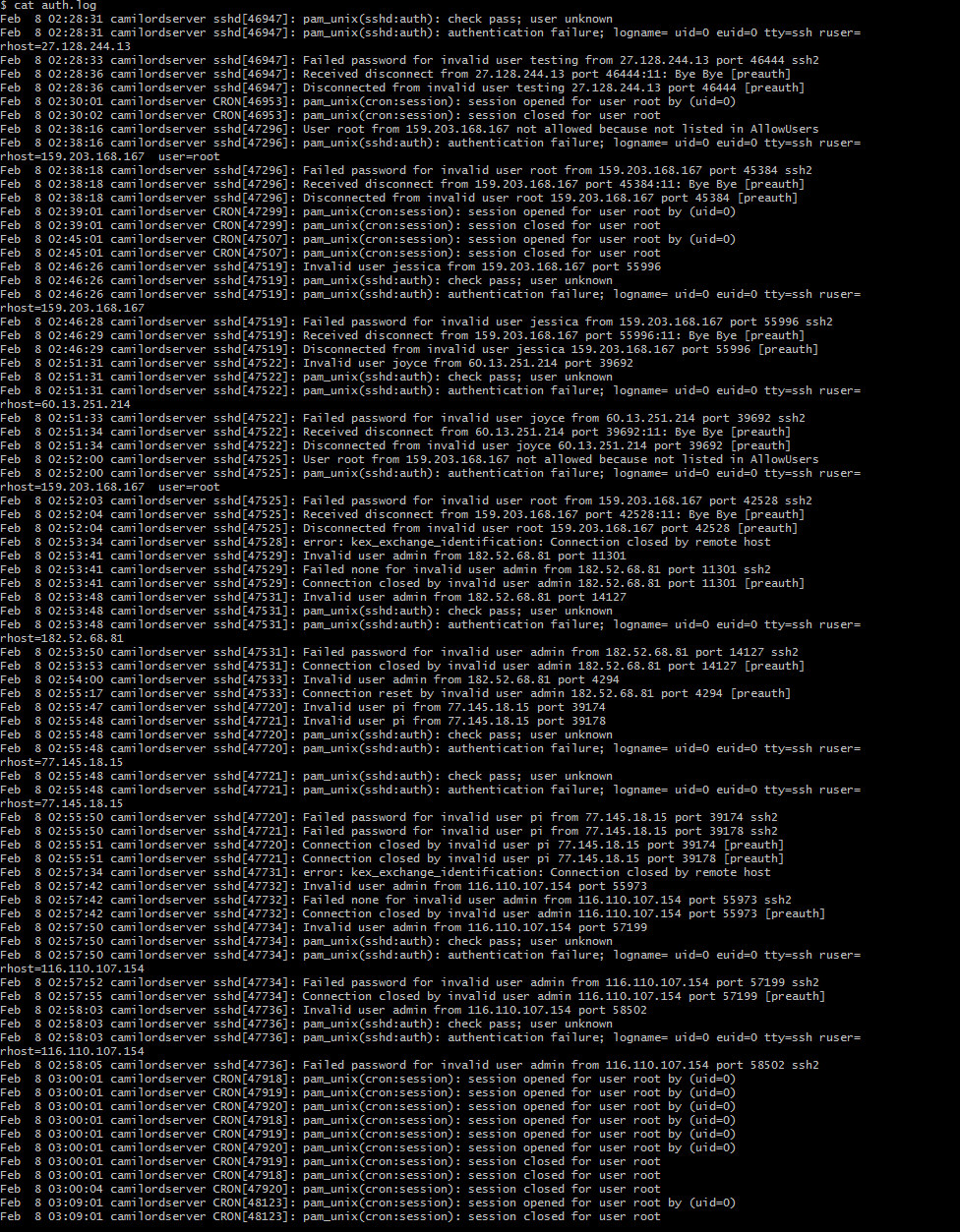
PS: when I was trying to resolve my problem, I stumble down with an issue that all incoming attempts still going thru, thanks to Sid Bachtiar when he mentioned about to remove the MASQUERADE and it was the one causing it. To read more about it, see https://linuxhacks.org/what-is-ip-masquerade-and-how-to-rule-it-with-iptables/
bash: load db with progress
Posted: 24 Sep 2020, 4:01am - ThursdayJust want to share this and my reminder how to create the script.
#!/bin/bash

NOW=$(date -d '-1 day' '+%Y-%m-%d')

COUNCIL=$1

gzip -dv db_${NOW}/${COUNCIL}_checklists.mysql.dmp.gz
gzip -dv db_${NOW}/${COUNCIL}_obca.mysql.dmp.gz
gzip -dv db_${NOW}/${COUNCIL}_fileman.mysql.dmp.gz
gzip -dv db_${NOW}/${COUNCIL}_logging.mysql.dmp.gz

mysql -h 127.0.0.1 -u root -psecret -e "CREATE DATABASE IF NOT EXISTS ${COUNCIL}_checklists"
mysql -h 127.0.0.1 -u root -psecret -e "CREATE DATABASE IF NOT EXISTS ${COUNCIL}_obca"
mysql -h 127.0.0.1 -u root -psecret -e "CREATE DATABASE IF NOT EXISTS ${COUNCIL}_logging"
mysql -h 127.0.0.1 -u root -psecret -e "CREATE DATABASE IF NOT EXISTS ${COUNCIL}_fileman"

#mysql ${COUNCIL}_checklists -h 127.0.0.1 -u root -psecret --force < db_${NOW}/${COUNCIL}_checklists.mysql.dmp
#mysql ${COUNCIL}_obca -h 127.0.0.1 -u root -psecret < db_${NOW}/${COUNCIL}_obca.mysql.dmp
#mysql ${COUNCIL}_fileman -h 127.0.0.1 -u root -psecret < db_${NOW}/${COUNCIL}_fileman.mysql.dmp
#mysql ${COUNCIL}_logging -h 127.0.0.1 -u root -psecret < db_${NOW}/${COUNCIL}_logging.mysql.dmp

pv db_${NOW}/${COUNCIL}_checklists.mysql.dmp | mysql ${COUNCIL}_checklists -h 127.0.0.1 -u root -psecret --force
pv db_${NOW}/${COUNCIL}_obca.mysql.dmp | mysql ${COUNCIL}_obca -h 127.0.0.1 -u root -psecret --force
pv db_${NOW}/${COUNCIL}_logging.mysql.dmp | mysql ${COUNCIL}_logging -h 127.0.0.1 -u root -psecret --force
pv db_${NOW}/${COUNCIL}_fileman.mysql.dmp | mysql ${COUNCIL}_fileman -h 127.0.0.1 -u root -psecret --force

gzip -9v db_${NOW}/${COUNCIL}_checklists.mysql.dmp
gzip -9v db_${NOW}/${COUNCIL}_obca.mysql.dmp
gzip -9v db_${NOW}/${COUNCIL}_fileman.mysql.dmp
gzip -9v db_${NOW}/${COUNCIL}_logging.mysql.dmp

echo "Import completed!"
Sample output below:
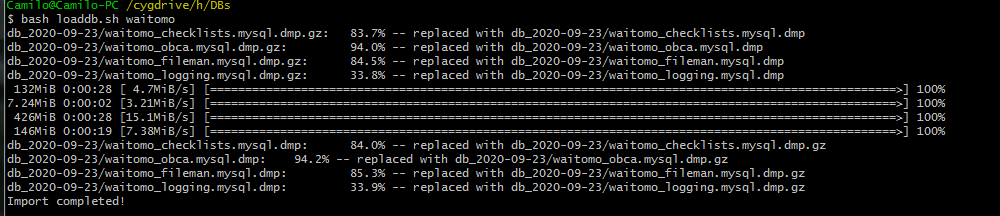
That's it! Cheers!
Cleaning HDDs and monitor it
Posted: 24 Jun 2020, 1:21am - WednesdayI've been assigned to clean up our server hardware and trying to create a monitoring how the progress going.
---------------- s04_wipe.sh ----------------------
#!/bin/bash

# s04
dd if=/dev/zero of=/dev/sdg status=progress
dd if=/dev/urandom of=/dev/sdg status=progress

---------------- s03_wipe.sh ----------------------
#!/bin/bash

# s03
dd if=/dev/zero of=/dev/sdf status=progress
dd if=/dev/urandom of=/dev/sdf status=progress

---------------- s02_wipe.sh ----------------------
#!/bin/bash

# s02
dd if=/dev/zero of=/dev/sde status=progress
dd if=/dev/urandom of=/dev/sde status=progress

---------------- s01_wipe.sh ----------------------
#!/bin/bash

# s01
dd if=/dev/zero of=/dev/sdd status=progress
dd if=/dev/urandom of=/dev/sdd status=progress

---------------- uat_wipe.sh ----------------------
#!/bin/bash

# uat
dd if=/dev/zero of=/dev/sdc status=progress
dd if=/dev/urandom of=/dev/sdc status=progress

---------------- db_wipe.sh ----------------------
#!/bin/bash

# database
dd if=/dev/zero of=/dev/sdb status=progress
dd if=/dev/urandom of=/dev/sdb status=progress

----------------os_wipe.sh ----------------------
#!/bin/bash

# os disk
dd if=/dev/zero of=/dev/sda status=progress
dd if=/dev/urandom of=/dev/sda status=progress
I ran it this way...
nohup bash s02_wipe.sh > sde.out 2>&1 &then this is my monitoring script (monitor.sh) to check the status:
#!/bin/bash

echo "/dev/sdb: "
echo $(tail -n 1 -c 120 sdb.out) | rev | cut -d "s" -f1,2,3,4| rev
echo -e "\n"
echo "/dev/sdc: "
echo $(tail -n 1 -c 120 sdc.out) | rev | cut -d "s" -f1,2,3,4| rev
echo -e "\n"
echo "/dev/sdd: "
echo $(tail -n 1 -c 120 sdd.out) | rev | cut -d "s" -f1,2,3,4| rev
echo -e "\n"
echo "/dev/sde: "
echo $(tail -n 1 -c 120 sde.out) | rev | cut -d "s" -f1,2,3,4| rev
echo -e "\n"
echo "/dev/sdf: "
echo $(tail -n 1 -c 120 sdf.out) | rev | cut -d "s" -f1,2,3,4| rev
echo -e "\n"
echo "/dev/sdg: "
echo $(tail -n 1 -c 120 sdg.out) | rev | cut -d "s" -f1,2,3,4| rev
echo -e "\n"
then run it by:
watch -d "bash monitor.sh"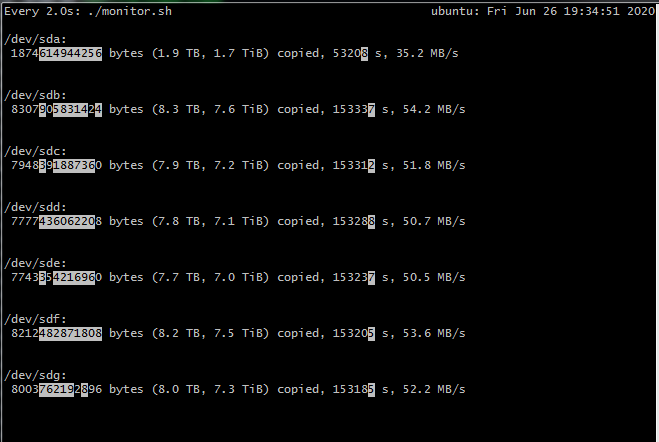
if you're needing like this, feel free to use my method.
C# WebRequest: Headers pitfall
Posted: 4 Jun 2020, 6:36am - ThursdayI have written my own WebRequest wrapper and it took me ages why I am getting a response of bad request. Hours of debugging, I realize that I have overwritten my Content-Type header with my Authentication-Authorization entries.
the issue:
            WebRequest request = WebRequest.Create(url);
            request.Method = method_request;
            request.ContentType = "application/x-www-form-urlencoded";
            /**
             * dont add content-type header on authenticate
             */
            if (!url.Contains("/authenticate"))
            {
                WebHeaderCollection whc = new WebHeaderCollection();
                whc.Add("Auth-username", authorizationEntity.getUsername());
                whc.Add("Auth-session-key", authorizationEntity.getSessionKey());
                request.Headers = whc;
            }

            if (method_request.ToUpper() == "POST")
            {
                Stream stream = request.GetRequestStream();
                byte[] postArray = Encoding.UTF8.GetBytes(flatten_post_data);
                stream.Write(postArray, 0, postArray.Length);
                stream.Close();
            }

            string Result;
            try
            {
                Console.WriteLine(request.Headers.ToString());
                StreamReader sr = new StreamReader(request.GetResponse().GetResponseStream());
                Result = sr.ReadToEnd();
            } catch(WebException e)
            {
                Console.WriteLine(e.Message);
                Result = "[]";
            }
the correct approach:
            WebRequest request = WebRequest.Create(url);
            request.Method = method_request;
            /**
             * dont add content-type header on authenticate
             */
            if (!url.Contains("/authenticate"))
            {
                WebHeaderCollection whc = new WebHeaderCollection();
                whc.Add("Auth-username", authorizationEntity.getUsername());
                whc.Add("Auth-session-key", authorizationEntity.getSessionKey());
                request.Headers = whc;
            }
            request.ContentType = "application/x-www-form-urlencoded";

            if (method_request.ToUpper() == "POST")
            {
                Stream stream = request.GetRequestStream();
                byte[] postArray = Encoding.UTF8.GetBytes(flatten_post_data);
                stream.Write(postArray, 0, postArray.Length);
                stream.Close();
            }

            string Result;
            try
            {
                Console.WriteLine(request.Headers.ToString());
                StreamReader sr = new StreamReader(request.GetResponse().GetResponseStream());
                Result = sr.ReadToEnd();
            } catch(WebException e)
            {
                Console.WriteLine(e.Message);
                Result = "[]";
            }
So that's it. lesson learn! LOL